
my real problem with inbox zero
the fear of having to do real work

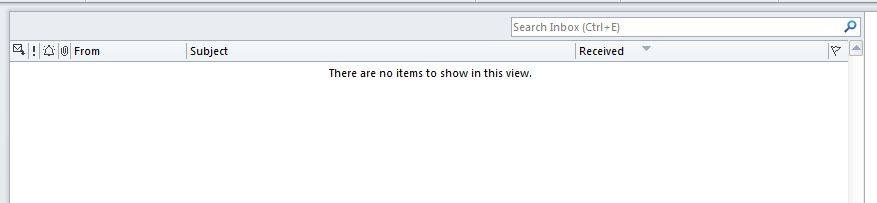
For probably the past ten years, until I quit my job last fall, I started many of my Facebook posts with my inbox count. The content of the post was usually not about email, but the email count was always there as a kind of guide to my mood, an indication of how stressed out I was with work.


I’m not sure how this started, other than that I like numbers and metrics. Most likely I initially put the count at the start of posts that were specifically about email, but then I figured out that my inbox count was so directly correlated to how overwhelmed I was feeling - it was a barometer for my mood. And I did seem to be thinking about the inbox all the time. So I ended up using it for a lot of my posts.
Like many of us, I spent hours of the day dealing with emails - responding to them, sending them, filing them away in folders. And I complained that between the email and the meetings,1 I could not get anything done.
It didn’t start that way. I’m sure you’ve seen the cartoon about how exciting email used to be:
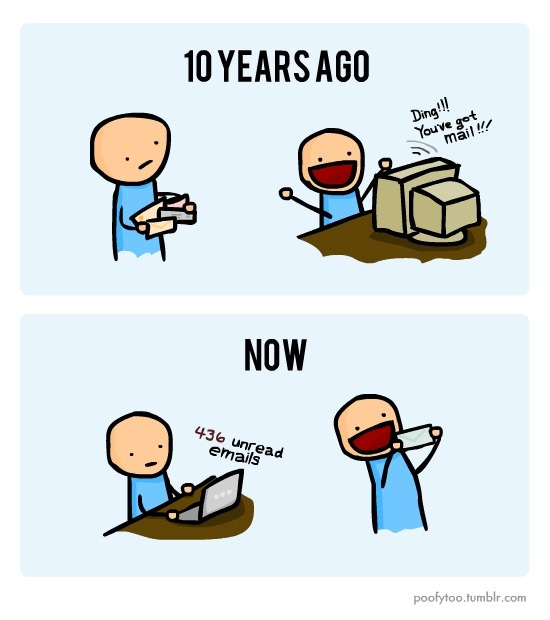
In 2011, when this was first published,2 ten years ago would have been 2001 (I know, that’s now more than 20 years ago), when email was still not the default mode of communication. And in the years since, email has gotten even more annoying. Used to be, we could only check on our desktops. Then laptops, then smartphones, and sometimes it’s hard to tell the difference between email and texts, if you are the kind of person who has alerts on (which I’m not). But there are differences,3 and for me one of the biggest is that a text (or a Teams/Slack message) really does need to be addressed in close to real time to be useful, while an email is meant to be asynchronous. You really don’t have to deal with them right away, but you do have to, eventually. And as long as they are sitting in the inbox, they are waiting to be dealt with.
So, I’ve been a proponent of inbox zero forever. I have worked diligently to get my inbox cleaned out so that I could do that work that was being held up by having to spend so much time on reviewing and answering the constant emails, and I think I tried every trick in the book. Including: checking email only a couple of times a day; triaging; using rules to keep things from even hitting the inbox; encouraging the use of non-email channels for long conversations; creating folders to distinguish to-dos from actual new emails; delegation of projects.
At times there was no hope. But here and there, I have actually managed to get the inbox empty, and to keep it that way for weeks at at a time. And as it turns out, that’s when my real problem shows up.
As it turns out, I have been using the inbox-cleaning as a bit of a distraction from the work that really needs doing. As long as I can spend hours every day slogging through the inbox, I feel like I am working and busy. I also feel like I have a valid excuse for not doing the kind of work that will move projects forward, or take some introspection: what I call the ‘real work’. But once that inbox is empty, what’s my excuse then? Turns out that ‘real work’ is actually harder than messing around with emails. Having an empty inbox is a very uncomfortable feeling. I have a list of things that need to be done, and the time to do them, and no ‘let me just spend ten minutes on the inbox’ to throw in front of them. So I freeze up.
Everyone is different of course, but for me there are at least two things going on: A fear of getting started, and the tendency to take little breaks when things start getting serious. And the solution is usually to use the Pomodoro technique.4 This somewhat ancient (the 1980’s were 40 years ago!) productivity tool involves naming the thing you will work on, and then setting timers for both work time and breaks, and then sticking to them. It’s extremely simple and works extremely well. Here are several of the reasons:
By naming the task explicitly, I am declaring my intent to work on it. It’s like a promise to myself.
By setting a timer for 25 minutes, I am committing to just that much at a time, which is much easier of an ask than saying that I’ll work on it all afternoon.
By enforcing a short break between work sessions, I know that there will be time later to check the email, or switch the laundry, and it’s easier not to stop working ‘just for a second’ and lose my momentum.
By setting up a structure, I’m taking away some of the anxiety and uncertainty that I tend to have when things are too big. There are boundaries, and I just have to stick to them and the thing will get done.
By using the same tool every time I need to do a big thing, I get accustomed to being in ‘work mode’ as soon as I open up the app. I’m associating a feeling of accomplishment with the timer, which makes it easier to get started, and more likely that I will be successful.
Now that I am not working at a job that has a high email volume, I don’t even have the inbox excuse (or nine-meeting days, which can be a similar distraction) to prevent me from doing my real work. I’m using my Pomodoro timer right now of course, to get this newsletter published. Of course, I have to remember to use it instead of just sitting around drinking coffee and scrolling Threads or reading other people’s Substacks. But once I do, I’m usually in great shape.
Do you have a method for making yourself do work you’d rather be distracted from? Or are you one of those people who sits down with your list and just plows through it? Let me know in the comments. And next time, I will talk a bit about gremlins.
I will say more about meetings some other time - I am a big fan of good meetings, and I have huge issues with bad meetings, and I have a lot to say about how to only have the first kind.
I have seen this thing all over the place, but I believe that I have now sourced it to the original, a tumblr user called ‘poofytoo’, who published it on July 24, 2011. His tumblr is still out there, but he has not posted since 2015, which may have been when he graduated from MIT. And now he is the co-founder and creative director for an immersive gaming experience company in Boston, and I am totally fascinated with his cool life and want to contact him. Maybe I will.
Which, yes, I have a lot to say about, and as usual I promise I will talk about it in another post.
You can use anything from a kitchen timer, to your watch, to a cute tomato-shaped Pomodoro timer, but what works for me is the Focus app. I like it because it keeps a history of my sessions and what I worked on, and syncs across all my devices. I can also export tasks from OmniFocus, which is where I track everything I’m working on. And it puts a little icon at the top of my screen to tell me how much time I have left on my work or break session.
I used to use multiple types of tools: lists handwritten on paper, sticky notes (for crucial to dos), a to-do chart on a white board, and my emails as to-dos, with form always dependent on function and priority. Now that I don’t work that job, I’m down to just a handwritten list in a spiral notebook (okay, and my notes app). All my work centered around a monthly deadline, and I would draw a blank if I were ever ahead of schedule. As in, if I’m not putting out a fire, I’m not sure what to do. I still feel that way.
I do like the sound of your timer!